
Verify downloads
In high-risk environments, how you install software matters as much as what software you install.
Anonomi is distributed outside centralized app stores by design.
That means verification is your responsibility.
This page explains when verification is critical, what to verify, and how to do it safely — including step-by-step instructions on Android.
When verification matters most
Section titled “When verification matters most”Treat verification as mandatory if any of the following apply:
- You downloaded the app over a monitored or hostile network
- You received the APK from someone else
- You used offline distribution or removable media
- The device or network could be tampered with
- The app will be used in a sensitive or high-risk context
If none of these apply and you trust your environment, verification is still recommended — just less urgent.
What you are verifying
Section titled “What you are verifying”Verification answers one question:
Is this file exactly the one the Anonomi project published?
You are checking that:
- The file was not modified
- The file was not replaced
- The file was not corrupted in transit
Verification does not:
- Make a compromised device safe
- Protect against malware already on your phone
- Replace good operational security
Official release sources
Section titled “Official release sources”Only trust releases from official Anonomi channels.
Official releases are published with:
- Versioned APKs
- Cryptographic checksums (hashes)
- Optional signature information
Never trust:
- Random APK mirrors
- Repacked or “optimized” builds
- Files that cannot be independently verified
Verification methods
Section titled “Verification methods”Method 1: Check the file hash (recommended)
Section titled “Method 1: Check the file hash (recommended)”This is the most reliable method.
What you need
- The downloaded APK
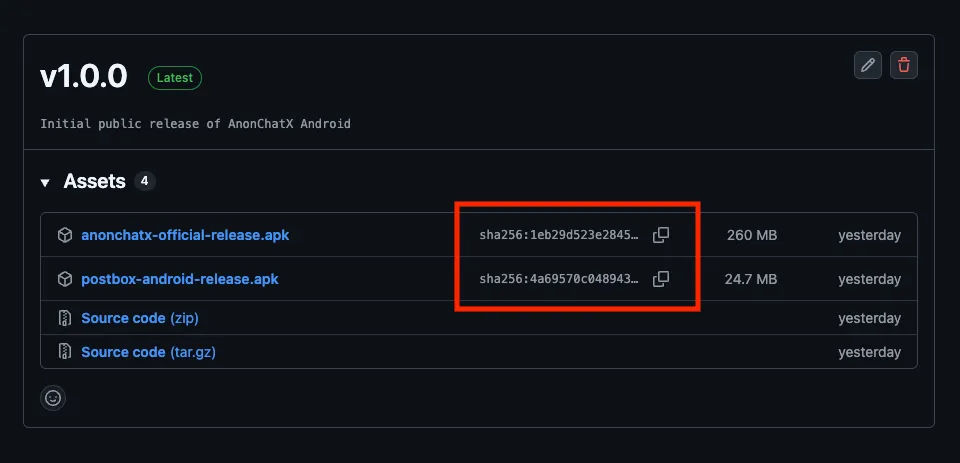
- The official checksum for that release (usually SHA-256)
How it works
- You calculate the hash of the APK
- You compare it with the published hash
- If they match exactly, the file is authentic
Even a single changed byte will result in a different hash.
Step-by-step: Verify an APK hash on Android
Section titled “Step-by-step: Verify an APK hash on Android”Below are practical ways to verify hashes directly on Android, without needing a computer.
Option A: Using a hash checker app (simplest)
Section titled “Option A: Using a hash checker app (simplest)”This is the easiest method for most users.
Recommended apps
-
Hash Droid — open source, available via F-Droid
- APK Analyzer (advanced users)
(Any app that can compute SHA-256 hashes is fine.)
Steps
- Install a hash/checksum app from a trusted source
- Open the app
- Select the downloaded Anonomi APK
- Choose SHA-256 as the hash algorithm
- Copy the resulting hash
- Compare it to the official SHA-256 checksum for that release
Result
- ✅ Exact match → file is authentic
- ❌ Any difference → do not install
Tip: Ignore formatting differences (uppercase/lowercase), but every character must match.
Option B: Using a terminal emulator (more control)
Section titled “Option B: Using a terminal emulator (more control)”This is useful if you already use terminal tools.
Recommended app
- Termux (from a trusted source)
Steps
-
Open the terminal app
-
Navigate to the directory containing the APK
-
Run: sha256sum anonomi-version.apk
-
Compare the output with the published checksum
If the values match exactly, the file is verified.
Option C: Verify on a separate trusted device (high-risk cases)
Section titled “Option C: Verify on a separate trusted device (high-risk cases)”If your phone itself might be compromised:
- Transfer the APK to a trusted secondary device
- Verify the hash there
- Only then install on the target phone (offline if possible)
This reduces the risk of on-device tampering.
Signature continuity (updates only)
Section titled “Signature continuity (updates only)”Android enforces that:
- Updates must be signed with the same key as the original install
This means:
- If Android accepts an APK as an update
- The signing key matches the previous version
This helps detect replacement attacks during updates, but it is not sufficient for first-time installs.
After installing
Section titled “After installing”Once installation is complete:
- Disable “unknown apps” permission for the installer
- Remove leftover APK files if they are no longer needed
- Avoid reusing the same APK across devices unless verified again
Offline and shared installs
Section titled “Offline and shared installs”If you receive Anonomi via:
- Offline sharing
- SD card
- USB transfer
You should:
- Verify the file before installing
- Prefer files that were verified before being shared
- Treat shared media as sensitive
Offline distribution reduces network risk, not integrity risk.
Common mistakes to avoid
Section titled “Common mistakes to avoid”- Verifying after installing
- Trusting filenames instead of hashes
- Downloading the APK and checksum from the same untrusted source
- Leaving sideload permissions enabled permanently
Summary
Section titled “Summary”- Verification protects against tampering, not bad decisions
- Hash checks are the gold standard
- Signature continuity helps with updates
- Verification matters most when the environment is hostile
When in doubt: verify first, install second.