
Verify downloads
هذا المحتوى غير متوفر بلغتك بعد.
In high-risk environments, how you install software matters as much as what software you install.
Anonomi Messenger is distributed through F-Droid and direct download, never through Google Play.
If you install from F-Droid, the client verifies each download against F-Droid’s signed index before installing. If you download an APK directly, verification is your responsibility.
This page explains when verification is critical, what to verify, and how to do it safely — including step-by-step instructions on Android.
When verification matters most
Section titled “When verification matters most”Treat verification as mandatory if any of the following apply:
- You downloaded the app over a monitored or hostile network
- You received the APK from someone else
- You used offline distribution or removable media
- The device or network could be tampered with
- The app will be used in a sensitive or high-risk context
If none of these apply and you trust your environment, verification is still recommended — just less urgent.
What you are verifying
Section titled “What you are verifying”Verification answers one question:
Is this file exactly the one the Anonomi Messenger project published?
You are checking that:
- The file was not modified
- The file was not replaced
- The file was not corrupted in transit
Verification does not:
- Make a compromised device safe
- Protect against malware already on your phone
- Replace good operational security
Official release sources
Section titled “Official release sources”Only trust releases from official Anonomi Messenger channels:
- F-Droid — https://f-droid.org/packages/org.anonomi.android/
- GitHub Releases — https://github.com/anonomi-org/anonomi-android/releases
Both channels ship APKs signed with the same key. See Downloads for details.
Official releases are published with:
- Versioned APKs
- Cryptographic checksums (hashes)
- Optional signature information
The two channels build different APKs, so their checksums differ. Always compare against the checksum for the channel you downloaded from. A mismatch across channels is expected.
Never trust:
- Random APK mirrors
- Repacked or “optimized” builds
- Files that cannot be independently verified
Verification methods
Section titled “Verification methods”Method 1: Check the file hash (recommended)
Section titled “Method 1: Check the file hash (recommended)”This is the most reliable method.
What you need
- The downloaded APK
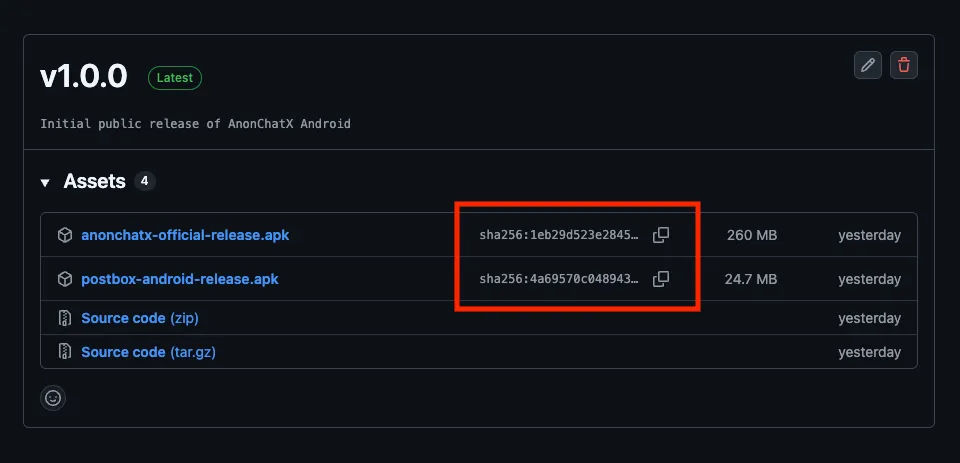
- The official checksum for that release (usually SHA-256)
How it works
- You calculate the hash of the APK
- You compare it with the published hash
- If they match exactly, the file is authentic
Even a single changed byte will result in a different hash.
Step-by-step: Verify an APK hash on Android
Section titled “Step-by-step: Verify an APK hash on Android”Below are practical ways to verify hashes directly on Android, without needing a computer.
Option A: Using a hash checker app (simplest)
Section titled “Option A: Using a hash checker app (simplest)”This is the easiest method for most users.
Recommended apps
-
Hash Droid — open source, available via F-Droid
- APK Analyzer (advanced users)
(Any app that can compute SHA-256 hashes is fine.)
Steps
- Install a hash/checksum app from a trusted source
- Open the app
- Select the downloaded Anonomi Messenger APK
- Choose SHA-256 as the hash algorithm
- Copy the resulting hash
- Compare it to the official SHA-256 checksum for that release
Result
- ✅ Exact match → file is authentic
- ❌ Any difference → do not install
Tip: Ignore formatting differences (uppercase/lowercase), but every character must match.
Option B: Using a terminal emulator (more control)
Section titled “Option B: Using a terminal emulator (more control)”This is useful if you already use terminal tools.
Recommended app
- Termux (from a trusted source)
Steps
-
Open the terminal app
-
Navigate to the directory containing the APK
-
Run: sha256sum anonomi-version.apk
-
Compare the output with the published checksum
If the values match exactly, the file is verified.
Option C: Verify on a separate trusted device (high-risk cases)
Section titled “Option C: Verify on a separate trusted device (high-risk cases)”If your phone itself might be compromised:
- Transfer the APK to a trusted secondary device
- Verify the hash there
- Only then install on the target phone (offline if possible)
This reduces the risk of on-device tampering.
Signature continuity (updates only)
Section titled “Signature continuity (updates only)”Android enforces that:
- Updates must be signed with the same key as the original install
This means:
- If Android accepts an APK as an update
- The signing key matches the previous version
This helps detect replacement attacks during updates, but it is not sufficient for first-time installs.
After installing
Section titled “After installing”Once installation is complete:
- Disable “unknown apps” permission for the installer
- Remove leftover APK files if they are no longer needed
- Avoid reusing the same APK across devices unless verified again
Offline and shared installs
Section titled “Offline and shared installs”If you receive Anonomi Messenger via:
- Offline sharing
- SD card
- USB transfer
You should:
- Verify the file before installing
- Prefer files that were verified before being shared
- Treat shared media as sensitive
Offline distribution reduces network risk, not integrity risk.
Common mistakes to avoid
Section titled “Common mistakes to avoid”- Verifying after installing
- Trusting filenames instead of hashes
- Downloading the APK and checksum from the same untrusted source
- Leaving sideload permissions enabled permanently
Summary
Section titled “Summary”- Verification protects against tampering, not bad decisions
- Hash checks are the gold standard
- Signature continuity helps with updates
- Verification matters most when the environment is hostile
When in doubt: verify first, install second.